Discover IPTV Empire’s features, pricing, installation process, support options, pros and cons, and the best IPTV alternatives in this detailed review.
What Is IPTV Empire?
IPTV Empire is an IPTV streaming service that says it allows users to watch numerous live TV channels, sports channels, pay per view matches, films, and series via internet connectivity. It is meant to operate on various devices such as smart TVs, Android gadgets, firestick, iOS devices, PC, and IPTV devices that accept M3U playlists or Xtream Codes.
As stated by the company, customers can get international programs from USA, Canada, UK, Europe, and other places using one subscription only.

IPTV Empire Features
IPTV Empire offers a wide range of features designed to enhance the streaming experience:
- 35,000+ live TV channels
- 140,000+ movies and TV series
- 4K, Full HD, and HD streaming quality
- Access to premium sports channels
- Pay-Per-View (PPV) events included
- Electronic Program Guide (EPG)
- Catch-Up TV functionality
- Anti-freeze streaming technology
- Multi-device compatibility
- Xtream Codes and M3U support
- Instant account activation
- VPN compatibility
- Weekly content updates
- International channel availability
- Optional adult content access
- 24/7 customer support
- Claimed 99.9% server uptime
Pros & Cons
| Pros | Cons |
|---|---|
| Large channel selection | Content licensing information is not clearly disclosed |
| Extensive VOD library | Service availability may vary by region |
| Supports multiple devices | Channel availability may change over time |
| Includes EPG and Catch-Up | Internet speed affects streaming quality |
| PPV and sports content included | Long-term service reliability cannot be guaranteed |
| Multiple subscription plans | No publicly verified free trial information |
IPTV Empire Pricing
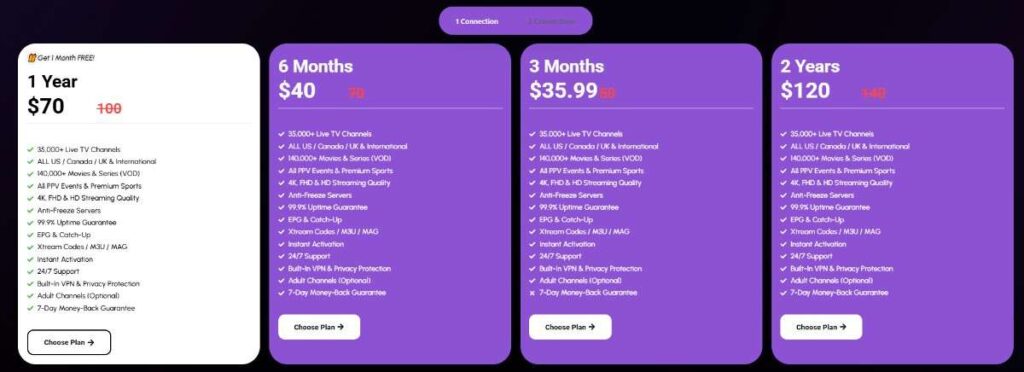
The provider advertises several subscription plans:
| Plan Duration | Price | Connections |
|---|---|---|
| 3 Months | $35.99 | 1 |
| 6 Months | $40.00 | 1 |
| 12 Months | $70.00 | 1 |
| 24 Months | $120.00 | 1 |
Included with all plans:
- Live TV channels
- VOD library
- Sports channels
- PPV events
- EPG
- Catch-Up TV
- Xtream Codes & M3U access
- Customer support
- Instant activation
Pricing may change over time. Verify current rates before purchasing.
IPTV Empire Installation Guide
It is relatively easy to set up IPTV Empire.
Step 1: Subscribe to the Service
Choose a suitable plan from the company’s website and subscribe.
Step 2: Get Your Login Information
Once you have paid, usually the following will be provided to you:
- Xtream Codes login information
- M3U Playlist
- Information on the server
Step 3: Install an IPTV Application
Supported IPTV applications are:
- IPTV Smarters Pro
- TiviMate
- Smart IPTV
- XCIPTV
- IBO Player
- Flix IPTV
Step 4: Enter Your Subscription Information
Enter your information into the IPTV application:
- Username
- Password
- Server
- OR
- Upload your M3U Playlist.
Step 5: Begin Watching Channels
Your channels, movies, and TV shows should now be available to watch using your IPTV application.
Payment Options
IPTV Empire states that payments are processed securely through its platform.
Typical IPTV payment methods may include:
- Credit cards
- Debit cards
- Cryptocurrency
- Online payment processors
Available payment methods may vary depending on the user’s location and current provider policies.
Does IPTV Empire Offer a Free Trial?
Based on the information found on the website, there is no indication of a free trial offer.
Nonetheless, the service offers its customers a 7-day money back guarantee that might help them use the service for seven days and then return it for a full refund if not satisfied.
Customer Support
IPTV Empire advertises 24/7 customer support for subscribers.
Support channels include:
- Email support
- Website contact forms
- Technical assistance
- Installation guidance
- Account activation help
- Troubleshooting support
Common support requests include:
- Login issues
- Buffering problems
- Device setup assistance
- Playlist configuration
- Channel requests
Best IPTV Alternatives
Users seeking alternative IPTV services may consider the following categories of providers:
1. Licensed Streaming Services
- YouTube TV
- Hulu + Live TV
- Sling TV
- Fubo
2. Free IPTV Solutions
- Public IPTV playlists
- Free-to-air streaming services
- Official broadcaster apps
3. Self-Hosted IPTV Platforms
- IPTV management solutions
- Personal media servers
- Network streaming applications
Licensed services generally offer greater reliability, customer protection, and content rights compliance.
Conclusion
The IPTV Empire is one of the feature-packed providers of IPTV, which offers a large amount of live TV channels, sports programs, movies, and TV series.
When deciding on using the service of this IPTV provider, you need to carefully consider its prices, refund policy, and other aspects, such as the legality of IPTV in your country. Comparison of IPTV Empire with legal streaming providers will be helpful in making the right choice.
Frequently Asked Questions (FAQ’s)
Is IPTV Empire compatible with Firestick?
Yes. IPTV Empire can be configured on Amazon Fire TV Stick devices using compatible IPTV player applications.
Does IPTV Empire support Smart TVs?
Yes. The service supports many Smart TV platforms through compatible IPTV applications.
Can I use IPTV Empire on multiple devices?
The number of simultaneous connections depends on the subscription package selected.
Does IPTV Empire include sports channels?
According to the provider, sports channels and PPV events are included in subscription packages.
Is an EPG available?
Yes. IPTV Empire advertises Electronic Program Guide (EPG) support.

