Discover SmixIPTV features, pricing, installation steps, support options, pros and cons, and the best IPTV alternatives in this detailed review.
What Is SmixIPTV?
SmixIPTV is an IPTV streaming platform allowing people to watch live TV channels, movies, TV shows, sports programs, and video on demand (VOD). As per the website of the service, it supports many different devices like Smart TV, Android device, Fire TV Stick, MAG box, PC, and mobile phones.
SmixIPTV claims to provide thousands of live channels and also thousands of HD movies and series in HD, Full HD, and even 4K resolutions.

Key Features of SmixIPTV
- Over 22,000 live tv channels available
- VOD movie and series content
- HD, Full HD and 4k Video Streaming
- EPG compatible
- Use on multiple devices
- Best when used with a Smart TV
- Compatible with Firestick and Android TV
- Newly added content on a continual basis
- Includes international channels
- Streaming for sports and Pay Per View content
- Built in VPN for improved security
- 24/7 Customer service
- Simple account set-up
- No buffering while watching content
- Flexible subscription terms
SmixIPTV Pros & Cons
| Pros | Cons |
|---|---|
| Large channel selection | Content availability may vary |
| Supports multiple devices | Internet speed affects performance |
| HD, FHD, and 4K streaming | No publicly verified uptime statistics |
| Extensive VOD library | Limited transparency regarding content licensing |
| EPG support available | Service quality may vary by region |
| Competitive pricing plans | Refund terms should be reviewed carefully |
| 24/7 customer support | Some features are marketing claims without independent verification |
SmixIPTV Pricing
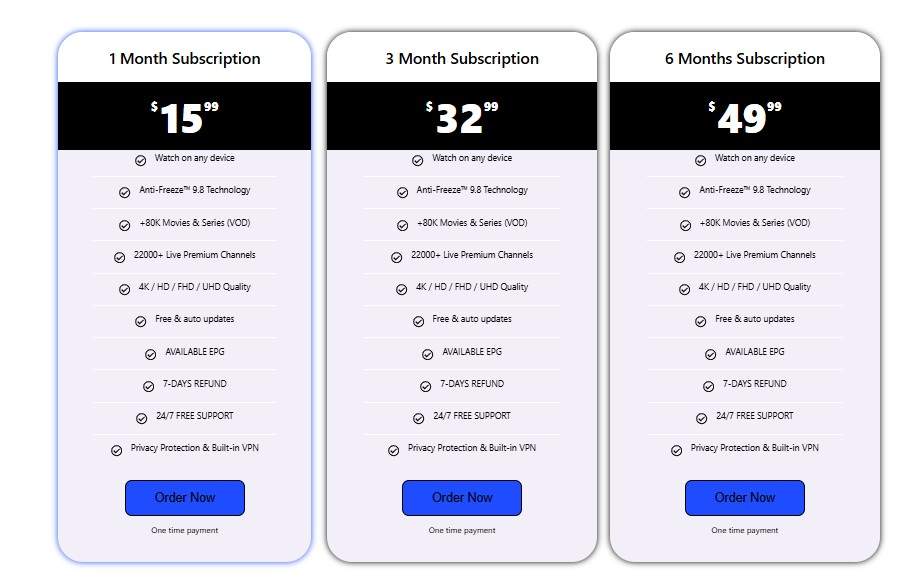
| Plan | Price |
|---|---|
| 1 Month | $15.99 |
| 3 Months | $32.99 |
| 6 Months | $49.99 |
| 12 Months | $69.99 |
| 24 Months | $99.99 |
Pricing Highlights
- One-time payment options
- No long-term contract required
- Multiple subscription lengths available
- Cost-effective annual and multi-year plans
Installation Process
The installation procedure of SmixIPTV can be fairly easy.
Step 1: Subscribe to Service
Select the suitable plan according to your preferences and register yourself in the system.
Step 2: Get Access Details
Access details are provided by email upon the completion of subscription payments.
Step 3: Install a Compatible Player for IPTV
Some of the IPTV players include:
- IPTV Smarters Pro
- TiviMate
- XCIPTV Player
- Smart IPTV
- IBO Player
- Smart STB
Step 4: Add Your IPTV Details
Input your credentials:
- Playlist M3U URL
- Xtream Codes API
- Username
- Password
- Server URL
Step 5: Begin Viewing
Your IPTV channel is ready to use.
Payment Options
SmixIPTV may support several payment methods depending on availability:
- Credit Cards
- Debit Cards
- Online Payment Gateways
- Cryptocurrency (if offered)
- International Payments
Users should verify available payment methods during checkout.
Free Trial
Many IPTV users prefer testing a service before committing to a subscription.
Free Trial Availability
Prospective customers should contact SmixIPTV support directly to determine:
- Trial availability
- Trial duration
- Trial channel access
- Device limitations during testing
A free trial can help evaluate streaming quality, channel selection, and server stability.
Customer Support
Customer support is an important factor when choosing an IPTV provider.
Support Features
- 24/7 assistance
- Email support
- Installation guidance
- Technical troubleshooting
- Subscription management
- Device setup assistance
Fast response times can significantly improve the overall user experience.
Best IPTV Alternatives
When looking into alternative IPTV services providers, look into the following providers:
- IPTV Trends
Famous for a wide variety of channels and support on multiple devices.
- Xtreme HD IPTV
Provides sports, entertainment, and international channels.
- IPTV Tune
Famous for offering high-definition videos and reliable server connections.
- Yeah IPTV
Provides various options of live television programs.
- King IPTV
Supports multi-devices and covers all kinds of worldwide channels.
When choosing an IPTV, always ensure you get a quality one based on content variety, customer support, pricing, and performance.
Conclusion
SmixIPTV is positioned as an advanced IPTV service providing a wide range of options including many channels available live, numerous video-on-demand programs, device flexibility, and support for 4K streams. With such an abundance of possibilities, it may be considered a good choice for Internet TV watching.
However, it is advisable to study the terms of service and other important details before using the service.
Frequently Asked Questions (FAQ’s)
Is SmixIPTV compatible with Firestick?
Yes, SmixIPTV claims compatibility with Amazon Fire TV Stick and other Android-based streaming devices.
Can I watch SmixIPTV on Smart TVs?
Yes, Smart TVs that support IPTV applications can generally access the service.
Does SmixIPTV offer 4K streaming?
The service advertises HD, Full HD, and 4K streaming quality where available.
How many channels does SmixIPTV provide?
According to its website, SmixIPTV offers more than 22,000 live channels.
Does SmixIPTV include movies and TV series?
Yes, the service claims to provide a large VOD library containing movies and television shows.

