Explore RexoTV, its features, pricing, free trial, installation steps, support options, pros & cons, best alternatives, and FAQs in this detailed guide.
What is RexoTV?
RexoTV is a media streaming application designed to provide access to live TV channels, movies, and on-demand shows across various categories. It is commonly used on Android-based devices, smart TVs, and streaming boxes, offering users flexibility and diversified viewing options.
RexoTV aggregates entertainment, sports, news, and international content into one interface, aiming to simplify streaming without complicated configurations.
Features
- Wide Channel Library: Access to local and international TV channels.
- Live TV + VOD (Video on Demand): Includes movies, series, and sports content.
- User-Friendly Interface: Clean navigation optimized for Android TVs and phones.
- Multiple Device Support: Works on smartphones, smart TVs, Fire Stick, and TV boxes.
- Regular Content Updates: Channels and libraries are refreshed frequently.
- Electronic Program Guide (EPG): Helps users track live programming schedules.
- HD Streaming: Supports high-quality playback with stable internet.
- Lightweight App: Minimal storage requirements and fast loading.
Pros & Cons
Pros
- Large content variety
- Simple installation process
- Good compatibility across devices
- Affordable pricing vs. traditional TV
- HD streaming quality
Cons
- Potential channel instability depending on source
- App not found in official app stores
- Requires strong internet connection for HD content
- Some features may vary by region
Pricing
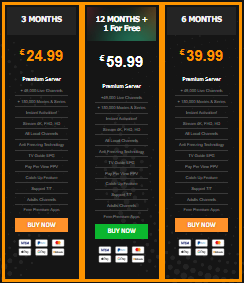
- 3 months =€ 24.99
- 6 months =€ 39.99
- 12 months =€ 59.99
Installation Guide
For Android Devices :
- Go to Settings > Security
- Enable Unknown Sources
- Download the RexoTV APK file from a trusted source
- Open the downloaded file and tap Install
- Launch the app and log in (if required)
For Amazon Fire Stick / Fire TV :
- Go to Settings > My Fire TV > Developer Options
- Enable Apps from Unknown Sources
- Install the Downloader app from Amazon Store
- Open Downloader and enter the APK link
- Download & Install RexoTV
- Open the app and configure settings
Payment
- Credit/Debit Cards
- PayPal
- Digital Wallets
- Cryptocurrency
- Local Payment
Free Trial
Some RexoTV resellers offer short free trials (typically 24–48 hours) for users to test channel availability, streaming quality, and compatibility. Trial availability depends on the seller.
Support
- Email or Ticket Support
- Live Chat (seller-dependent)
- FAQs & Troubleshooting Guides
- Community Groups & Telegram Channels
Best Alternative
Conclusion
RexoTV is a versatile streaming app that offers diverse content, device compatibility, and user-friendly navigation at an affordable price point. While it may have limitations such as channel stability and lack of official app store presence, it remains a popular choice for users seeking customizable live TV and VOD solutions. Users should always verify the source to ensure reliability, support, and safe transactions.
FAQs
1. Is RexoTV legal?
Legality depends on content sources and regional licensing. Users should verify compliance in their country.
2. Does RexoTV require a fast internet connection?
Yes. For HD streaming, at least 10–20 Mbps is recommended.
3. Can I install RexoTV on iOS?
RexoTV is optimized for Android platforms. iOS compatibility may be limited or unavailable.
4. Does RexoTV offer refunds?
Refund policies vary by seller. Always confirm before purchasing.
5. Can I use RexoTV on multiple devices?
This depends on the purchased plan. Some allow multi-device usage while others do not.