Learn what FireViewTV is, pricing, features, installation guide, pros and cons, support, free trial, alternatives, conclusion and FAQs for IPTV viewers.
What Is FireViewTV?
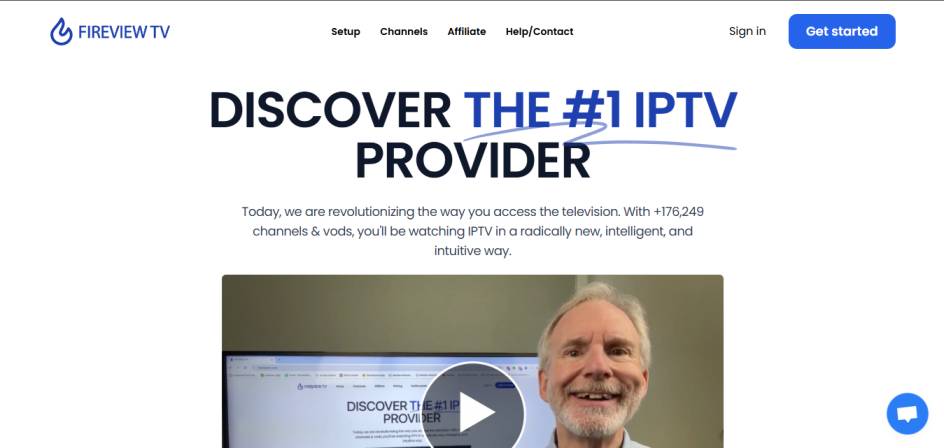
FireViewTV is an IPTV (Internet Protocol Television) streaming service that provides access to live TV channels, movies, series, and sports content through an internet connection. Unlike traditional cable, IPTV delivers content digitally and allows users to stream across smartphones, smart TVs, computers, and Android-based devices. FireViewTV is known for offering an extensive channel library and VOD (Video On Demand) catalogs suitable for international audiences.
Features
- Large live TV channel selection
- Movies and TV series on-demand
- EPG (Electronic Program Guide) support
- 3-day catch-up on supported channels
- HD and some 4K streaming quality
- Anti-freeze and low-buffering technology
- Fast activation after subscription
- Compatible with Smart TVs, Android devices, Firestick, and tablets
Pros & Cons
Pros
- Wide international channel availability
- Supports HD and select 4K playback
- Works on multiple devices and platforms
- Offers seamless VOD content library
- Flexible subscription packages
- Easy-to-navigate EPG and channel sorting
Cons
- IPTV legality varies by region
- No official app in major app stores
- Setup requires manual configuration
- Customer support response can vary
- Performance depends on internet speed
Pricing
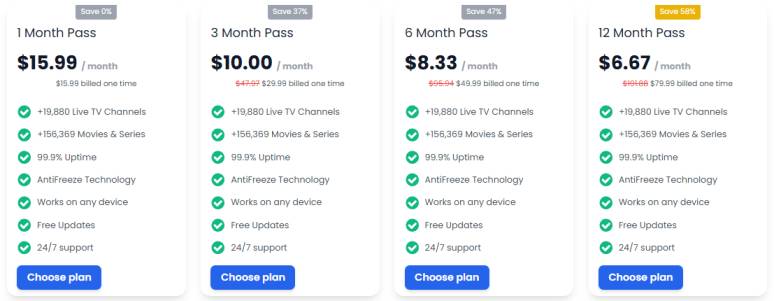
- 1 months =$ 15.99
- 3 months =$ 30.00
- 6 months =$ 49.99
- 12 months =$ 80.00
Installation Guide
- Choose a Plan: Select a subscription plan on the FireViewTV platform.
- Receive Credentials: After payment, you receive your login details by email.
- Install IPTV Player: Download an IPTV player such as IPTV Smarters or TiviMate on your device.
- Enter Details: Input your username, password, and server URL into the IPTV player.
- Start Streaming: Refresh the playlist and begin watching.
Payment
- Credit/Debit Cards
- PayPal or similar payment processors
- Cryptocurrency (varies by availability)
Free Trial
FireViewTV often provides a paid trial option for a short duration (such as 24 hours). This allows users to test stability, channel availability, and compatibility before committing to a full subscription.
Support
- Email support channels
- Website contact pages or help forms
- Setup guides for specific devices
Best Alternatives
Conclusion
FireViewTV is a feature-rich IPTV solution suitable for users seeking global live channels and on-demand content across various devices. Its compatibility, channel variety, and streaming quality make it appealing, but users should check local IPTV regulations, internet speed requirements, and customer service experiences before subscribing. Evaluating trial options and alternative services ensures the best streaming experience.
FAQs
1. Is FireViewTV legal?
Legality depends on regional IPTV regulations; users must verify their local laws.
2. Can FireViewTV be used on multiple devices?
Yes, but simultaneous usage depends on the subscription terms.
3. Why does streaming sometimes buffer?
Buffering is usually caused by slow or unstable internet speed or server load.
4. Does FireViewTV offer refunds?
Refunds may be available based on plan type and policy terms.
5. Do I need a VPN for FireViewTV?
A VPN is not mandatory but some users prefer it for privacy and stability.