Discover CapstorTV’s features, pricing, installation guide, payment methods, customer support, pros and cons, and the best IPTV alternatives to help you choose the right streaming service.

The need for IPTV services is ever-increasing as more people desire an efficient and cost-effective means to watch live TV channels, movies, sports and videos. Capstortv is an IPTV service provider that boasts of offering thousands of live TV channels as well as video-on-demand programs to its global customers.
In this review, we will look at Capstortv and what it provides, its features, pricing, installation, payment options, customer care and alternatives.
What is Capstortv?
Capstortv is a live IPTV streaming channel that gives you access to thousands of live TV channels, movies, shows, sports, and video-on-demand services via the Internet connection. It claims that there are over 69,000 live TV channels and over 100,000 VOD available on their platform.
It is a service for users who need to watch TV channels and videos on various devices without a need for cable or satellite subscription.
Capstortv Features
The following are some of the features offered by Capstortv to its users for providing them with an enhanced experience in their viewing:
- Over 69,000 live TV channels
- Over 100,000 movies & TV series
- Compatibility with HD, Full HD & 4K
- Complete world coverage
- Sport channels & premium entertainment channels
- Compatibility with various types of devices
- Streaming server
- 99.9% uptime
- EPG service provision
- VOD service provision
- Does not need satellite & aerial
- Reselling service
- 24/7 customer support
Pros & Cons
| Pros | Cons |
|---|---|
| Large channel selection | Content licensing information is not clearly displayed |
| Extensive VOD library | Service availability may vary by region |
| Supports multiple devices | Internet connection required |
| HD, FHD, and 4K streaming options | Free trial information may be limited |
| Affordable subscription plans | Streaming quality depends on network speed |
| 24/7 customer support | Some content may not be available in every country |
Capstortv Pricing
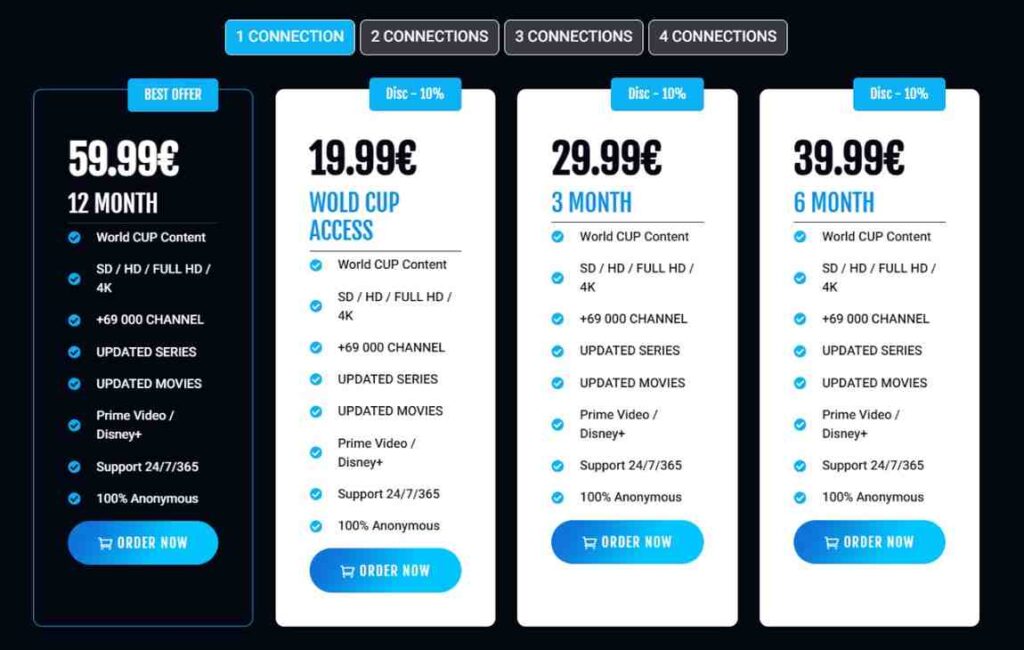
The website advertises the following subscription plans:
| Plan | Duration | Price |
|---|---|---|
| World Cup Access | Special Access | €19.99 |
| Basic Plan | 3 Months | €29.99 |
| Standard Plan | 6 Months | €39.99 |
| Premium Plan | 12 Months | €59.99 |
Note: Pricing and promotional offers may change without notice.
Installation Guide
Capstortv can normally be accessed through IPTV applications. This installation process may include:
Step 1: Selecting an Appropriate Device
This device could include:
- Android TV
- Android phone and tablet
- Fire Stick TV
- Smart TV
- Windows Computer
- Mac OS computer
- Set-top box for IPTV
Step 2: Subscribing
Select any subscription service of your choice and register.
Step 3: Getting IPTV Credentials
On successful payment, you will have:
- M3U playlist url
- Xtream codes login credentials
- EPG
Step 4: Installing an IPTV Player
Here are some of the IPTV players that you can choose:
- IPTV Smarters
- TiviMate
- Smart IPTV
- XCIPTV
- OTT Navigator
Step 5: Adding Your Subscription
Add your credentials to the IPTV player you have installed.
Step 6: Streaming
You are now ready to stream channels, movies, and TV shows.
Payment Methods
Capstortv may support various payment methods depending on availability and region. Common options often include:
- Credit cards
- Debit cards
- Online payment processors
- Cryptocurrency (if supported)
- Other digital payment solutions
Users should verify available payment methods directly during checkout.
Free Trial
Based on the information available on the website, a dedicated free trial offering is not prominently advertised.
Before subscribing, consider contacting customer support to determine whether:
- A trial account is available
- A demo service is offered
- Refund policies apply to your purchase
Customer Support
Capstortv promotes 24/7 customer support through:
- Email support
- WhatsApp assistance
- Customer inquiry forms
- Technical setup support
Support availability and response times may vary depending on demand and time zone.
Best IPTV Alternatives
If you’re exploring other IPTV options, consider these alternatives:
| IPTV Service | Key Benefits |
|---|---|
| IPTV Smarters Pro | Popular IPTV player with broad compatibility |
| TiviMate | Advanced IPTV interface for Android TV |
| XCIPTV | User-friendly IPTV application |
| OTT Navigator | Powerful channel organization features |
| Smart IPTV | Widely used Smart TV IPTV solution |
When evaluating IPTV services, prioritize providers that clearly explain their content licensing, service terms, and customer support policies.
Conclusion
Capstortv presents itself as an IPTV provider that provides a wide range of channels, movies, TV series, sports content, and multi-device functionality. Competitive prices and an enormous database of content might attract those individuals who are looking for an alternative to regular TV providers.
Nevertheless, potential subscribers must be careful to consider service specifications, content licensing details, money-back policy, and other factors related to local legislation.
Frequently Asked Questions (FAQ’s)
What is Capstortv?
Capstortv is an IPTV service that claims to offer live TV channels, sports, movies, and video-on-demand content through internet streaming.
How many channels does Capstortv offer?
According to its website, Capstortv provides access to more than 69,000 live TV channels.
Does Capstortv support 4K streaming?
Yes, the service advertises support for SD, HD, Full HD, and 4K content where available.
Which devices are compatible with Capstortv?
The service can generally be used on Android devices, Fire TV Stick, Smart TVs, Windows PCs, macOS systems, and IPTV-compatible applications.
Is there a free trial available?
The website does not prominently advertise a free trial. Users should contact support for the latest trial availability.

